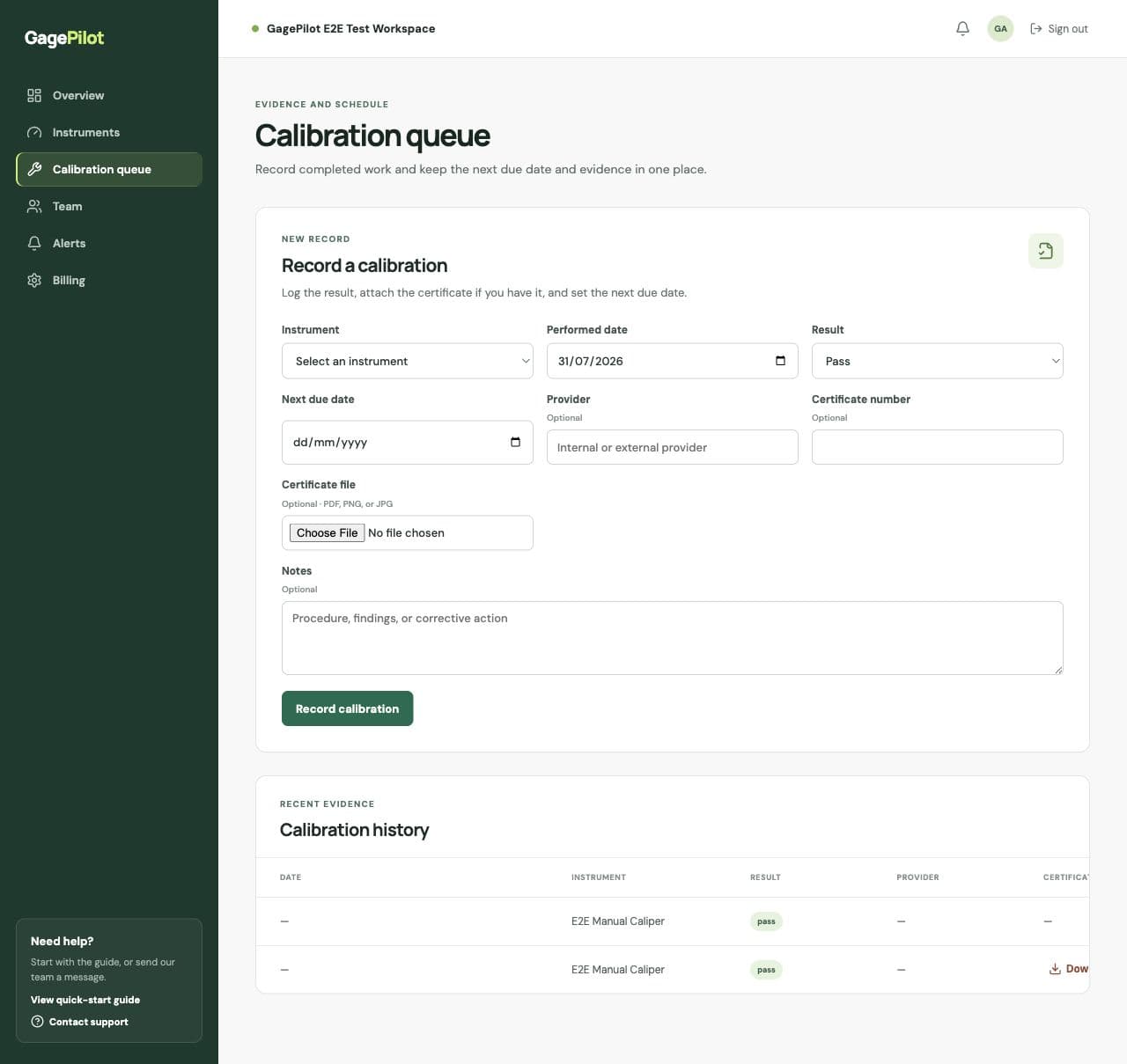
Record a completed calibration
- Open Calibration queueChoose the instrument from the register.
- Enter the performed dateUse the date the calibration was completed, not the date the certificate was emailed.
- Choose the resultSelect Pass or Fail / out of tolerance. A failed result marks the instrument out of service.
- Set the next due dateUse the date required by your calibration procedure or approved interval decision.
- Add provider and certificateEnter the provider, certificate number, notes, and PDF or image certificate when available.
- Save the recordThe calibration history is updated and the instrument’s next due date is refreshed.
What happens after a failed result
A failed or out-of-tolerance result marks the instrument out of service so it remains visible as an exception. Follow your organization’s procedure for evaluation, repair, recall, and disposition; the software does not make that quality decision for you.
Make the record audit-friendly
- Use the provider’s certificate number when one exists.
- Add notes about the procedure, findings, or corrective action.
- Attach the certificate at the time you record the event.
- Keep the next due date consistent with the approved interval decision.